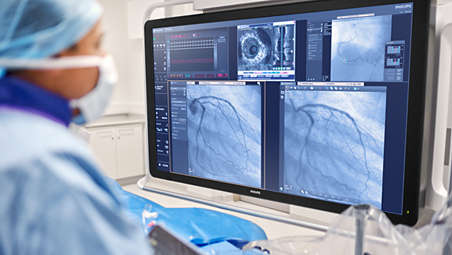
Touch screen module pro

Intuitive touch screen controle module at tableside

Find similar products

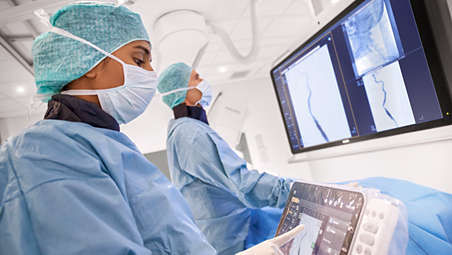
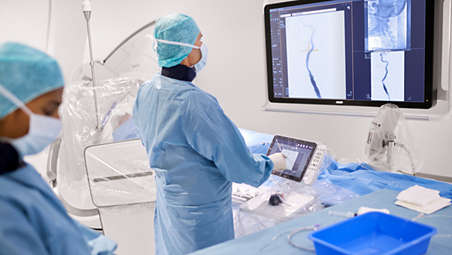
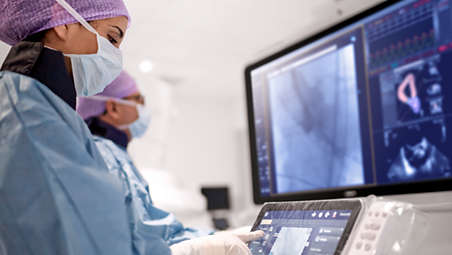
The TSM Pro allows for integrating and connecting the touch screen operation of compatible applications, resulting in less clutter at tableside. Access physiology, IVUS, hemodynamic measurements, interventional tools and all imaging parameters – to work quickly and decisively. The TSM Pro allows for integrating and connecting the touch screen operation of compatible applications; this results in less clutter at tableside.

Features
Seamless user experience to enhance decision making
Seamless user experience to enhance decision making video

Seamless user experience to enhance decision making

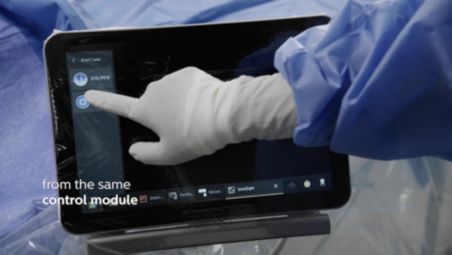
To support fast, informed clinical decisions, you can control compatible applications, such as our physiology and imaging platform IntraSight, Philips Interventional Hemodynamic system and interventional tools, via the central touch screen and FlexVision Pro at tableside. This allows you to confidently evaluate and decide in the sterile field, saving time and helping avoid delays.

Seamless user experience to enhance decision making

Seamless user experience to enhance decision making video

To support fast, informed clinical decisions, you can control compatible applications, such as our physiology and imaging platform IntraSight, Philips Interventional Hemodynamic system and interventional tools, via the central touch screen and FlexVision Pro at tableside. This allows you to confidently evaluate and decide in the sterile field, saving time and helping avoid delays.

Seamless user experience to enhance decision making

To support fast, informed clinical decisions, you can control compatible applications, such as our physiology and imaging platform IntraSight, Philips Interventional Hemodynamic system and interventional tools, via the central touch screen and FlexVision Pro at tableside. This allows you to confidently evaluate and decide in the sterile field, saving time and helping avoid delays.
Click here for more information
Seamless user experience to enhance decision making
Seamless user experience to enhance decision making video

Seamless user experience to enhance decision making

To support fast, informed clinical decisions, you can control compatible applications, such as our physiology and imaging platform IntraSight, Philips Interventional Hemodynamic system and interventional tools, via the central touch screen and FlexVision Pro at tableside. This allows you to confidently evaluate and decide in the sterile field, saving time and helping avoid delays.
Easily mark relevant details on 2D images on screen
Easily mark relevant details on 2D images on screen video

Easily mark relevant details on 2D images on screen

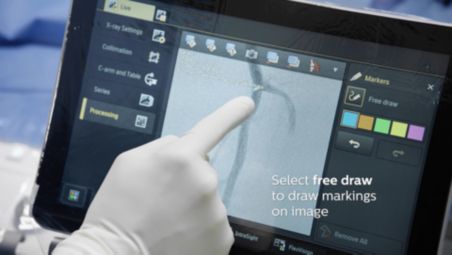
The digital marker tool allows you to highlight a portion of the region of interest that stays visible during fluoroscopy and exposure, thus providing you with visual guidance during the procedure. The tool adapts to changes of magnification, zoom, SID, or detector format. The markings are clearly displayed on the fluoroscopy and reference images, and they scale and pan with the image. This can be useful for marking a bifurcation, side branches and other relevant details. With the marker tool, there is no need for a separate marker application in the lab.

Easily mark relevant details on 2D images on screen

Easily mark relevant details on 2D images on screen video

The digital marker tool allows you to highlight a portion of the region of interest that stays visible during fluoroscopy and exposure, thus providing you with visual guidance during the procedure. The tool adapts to changes of magnification, zoom, SID, or detector format. The markings are clearly displayed on the fluoroscopy and reference images, and they scale and pan with the image. This can be useful for marking a bifurcation, side branches and other relevant details. With the marker tool, there is no need for a separate marker application in the lab.

Easily mark relevant details on 2D images on screen

The digital marker tool allows you to highlight a portion of the region of interest that stays visible during fluoroscopy and exposure, thus providing you with visual guidance during the procedure. The tool adapts to changes of magnification, zoom, SID, or detector format. The markings are clearly displayed on the fluoroscopy and reference images, and they scale and pan with the image. This can be useful for marking a bifurcation, side branches and other relevant details. With the marker tool, there is no need for a separate marker application in the lab.
Click here for more information
Easily mark relevant details on 2D images on screen
Easily mark relevant details on 2D images on screen video

Easily mark relevant details on 2D images on screen

The digital marker tool allows you to highlight a portion of the region of interest that stays visible during fluoroscopy and exposure, thus providing you with visual guidance during the procedure. The tool adapts to changes of magnification, zoom, SID, or detector format. The markings are clearly displayed on the fluoroscopy and reference images, and they scale and pan with the image. This can be useful for marking a bifurcation, side branches and other relevant details. With the marker tool, there is no need for a separate marker application in the lab.
Easily perform two-point measurements on screen
Easily perform two-point measurements on screen video

Easily perform two-point measurements on screen

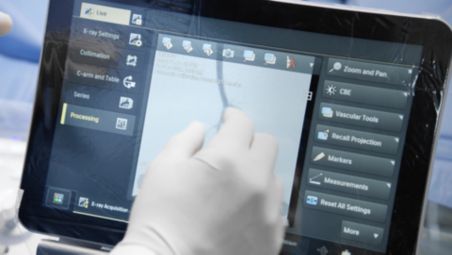
Quickly measure distance on a 2D image with the two-point measurement on the touch screen. 88% believe they can have more focus on their patient thanks to full tableside control with the touch screen module.

Easily perform two-point measurements on screen

Easily perform two-point measurements on screen video

Quickly measure distance on a 2D image with the two-point measurement on the touch screen. 88% believe they can have more focus on their patient thanks to full tableside control with the touch screen module.

Easily perform two-point measurements on screen

Quickly measure distance on a 2D image with the two-point measurement on the touch screen. 88% believe they can have more focus on their patient thanks to full tableside control with the touch screen module.
Click here for more information
Easily perform two-point measurements on screen
Easily perform two-point measurements on screen video

Easily perform two-point measurements on screen

Quickly measure distance on a 2D image with the two-point measurement on the touch screen. 88% believe they can have more focus on their patient thanks to full tableside control with the touch screen module.
Promotes effective teamwork

Promotes effective teamwork

To promote effective teamwork, Parallel Working helps reduce room turnover and procedure times, improving lab efficiency. You can easily adjust all X-ray settings, collimate on the clinical image and select images for review and post-processing — all with tablet-like ease. Store and recall of system positions is just as simple.

Promotes effective teamwork

Promotes effective teamwork
To promote effective teamwork, Parallel Working helps reduce room turnover and procedure times, improving lab efficiency. You can easily adjust all X-ray settings, collimate on the clinical image and select images for review and post-processing — all with tablet-like ease. Store and recall of system positions is just as simple.

Promotes effective teamwork

To promote effective teamwork, Parallel Working helps reduce room turnover and procedure times, improving lab efficiency. You can easily adjust all X-ray settings, collimate on the clinical image and select images for review and post-processing — all with tablet-like ease. Store and recall of system positions is just as simple.
Click here for more information
Promotes effective teamwork

Promotes effective teamwork

To promote effective teamwork, Parallel Working helps reduce room turnover and procedure times, improving lab efficiency. You can easily adjust all X-ray settings, collimate on the clinical image and select images for review and post-processing — all with tablet-like ease. Store and recall of system positions is just as simple.
Clear-cut communication

Clear-cut communication

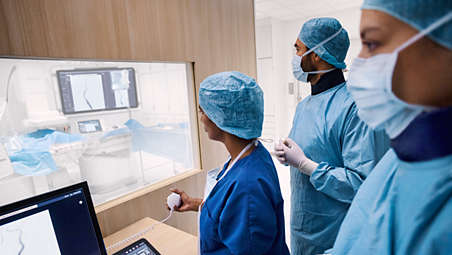
A large mouse pointer can be made visible on your live image in the exam and control room to make communication clear-cut and supports communication between ER/CR via touch screen operation. When larger teams are present in the exam room, this aids communication so they can focus on the procedure.

Clear-cut communication

Clear-cut communication
A large mouse pointer can be made visible on your live image in the exam and control room to make communication clear-cut and supports communication between ER/CR via touch screen operation. When larger teams are present in the exam room, this aids communication so they can focus on the procedure.

Clear-cut communication

A large mouse pointer can be made visible on your live image in the exam and control room to make communication clear-cut and supports communication between ER/CR via touch screen operation. When larger teams are present in the exam room, this aids communication so they can focus on the procedure.
Click here for more information
Clear-cut communication

Clear-cut communication

A large mouse pointer can be made visible on your live image in the exam and control room to make communication clear-cut and supports communication between ER/CR via touch screen operation. When larger teams are present in the exam room, this aids communication so they can focus on the procedure.
Bright visual cues
Bright visual cues

Bright visual cues

The new user interface on the touch screen module Pro, with its distinctive black background, makes it easier to see the information you need. Active applications and steps are highlighted to provide extra user guidance.

Bright visual cues

Bright visual cues
The new user interface on the touch screen module Pro, with its distinctive black background, makes it easier to see the information you need. Active applications and steps are highlighted to provide extra user guidance.

Bright visual cues

The new user interface on the touch screen module Pro, with its distinctive black background, makes it easier to see the information you need. Active applications and steps are highlighted to provide extra user guidance.
Click here for more information
Bright visual cues
Bright visual cues

Bright visual cues

The new user interface on the touch screen module Pro, with its distinctive black background, makes it easier to see the information you need. Active applications and steps are highlighted to provide extra user guidance.
Flexible placement
Flexible placement

Flexible placement

The enhanced touch screen module Pro can be located tableside, at the end of the table for technologists or in the control room to fit different types of procedures and ways of working. Up to three touch screen modules can be integrated into a single system. 

Flexible placement

Flexible placement
The enhanced touch screen module Pro can be located tableside, at the end of the table for technologists or in the control room to fit different types of procedures and ways of working. Up to three touch screen modules can be integrated into a single system. 

Flexible placement

The enhanced touch screen module Pro can be located tableside, at the end of the table for technologists or in the control room to fit different types of procedures and ways of working. Up to three touch screen modules can be integrated into a single system. 
Click here for more information
Flexible placement
Flexible placement

Flexible placement

The enhanced touch screen module Pro can be located tableside, at the end of the table for technologists or in the control room to fit different types of procedures and ways of working. Up to three touch screen modules can be integrated into a single system. 
Welcomes third party systems

Welcomes third party systems

Other applications can be integrated with the enhanced touch screen module Pro to improve efficiency and reduce delays. You can retrieve files from the PACS and control peripheral equipment, such as digital IVUS and other interventional tools and analysis applications. Switch between connected 3rd party modalities with a maximum of 2 user interactions. Automatically display compatible mobile or integrated 3rd party modalities on TSM when connected to the network.

Welcomes third party systems

Welcomes third party systems
Other applications can be integrated with the enhanced touch screen module Pro to improve efficiency and reduce delays. You can retrieve files from the PACS and control peripheral equipment, such as digital IVUS and other interventional tools and analysis applications. Switch between connected 3rd party modalities with a maximum of 2 user interactions. Automatically display compatible mobile or integrated 3rd party modalities on TSM when connected to the network.

Welcomes third party systems

Other applications can be integrated with the enhanced touch screen module Pro to improve efficiency and reduce delays. You can retrieve files from the PACS and control peripheral equipment, such as digital IVUS and other interventional tools and analysis applications. Switch between connected 3rd party modalities with a maximum of 2 user interactions. Automatically display compatible mobile or integrated 3rd party modalities on TSM when connected to the network.
Click here for more information
Welcomes third party systems

Welcomes third party systems

Other applications can be integrated with the enhanced touch screen module Pro to improve efficiency and reduce delays. You can retrieve files from the PACS and control peripheral equipment, such as digital IVUS and other interventional tools and analysis applications. Switch between connected 3rd party modalities with a maximum of 2 user interactions. Automatically display compatible mobile or integrated 3rd party modalities on TSM when connected to the network.
Enhances visibility of details

Enhances visibility of details

To support easy navigation, simply zoom the X-ray and/or roadmap image with your fingers and it is zoomed by 200%. With the Dual Fluoro option, the zoomed image will remain on screen during the procedure.

Enhances visibility of details

To support easy navigation, simply zoom the X-ray and/or roadmap image with your fingers and it is zoomed by 200%. With the Dual Fluoro option, the zoomed image will remain on screen during the procedure.

Enhances visibility of details

To support easy navigation, simply zoom the X-ray and/or roadmap image with your fingers and it is zoomed by 200%. With the Dual Fluoro option, the zoomed image will remain on screen during the procedure.
  • Seamless user experience to enhance decision making
  • Easily mark relevant details on 2D images on screen
  • Easily perform two-point measurements on screen
  • Promotes effective teamwork
See all features
Seamless user experience to enhance decision making
Seamless user experience to enhance decision making video

Seamless user experience to enhance decision making

To support fast, informed clinical decisions, you can control compatible applications, such as our physiology and imaging platform IntraSight, Philips Interventional Hemodynamic system and interventional tools, via the central touch screen and FlexVision Pro at tableside. This allows you to confidently evaluate and decide in the sterile field, saving time and helping avoid delays.

Seamless user experience to enhance decision making

Seamless user experience to enhance decision making video

To support fast, informed clinical decisions, you can control compatible applications, such as our physiology and imaging platform IntraSight, Philips Interventional Hemodynamic system and interventional tools, via the central touch screen and FlexVision Pro at tableside. This allows you to confidently evaluate and decide in the sterile field, saving time and helping avoid delays.

Seamless user experience to enhance decision making

To support fast, informed clinical decisions, you can control compatible applications, such as our physiology and imaging platform IntraSight, Philips Interventional Hemodynamic system and interventional tools, via the central touch screen and FlexVision Pro at tableside. This allows you to confidently evaluate and decide in the sterile field, saving time and helping avoid delays.
Click here for more information
Seamless user experience to enhance decision making
Seamless user experience to enhance decision making video

Seamless user experience to enhance decision making

To support fast, informed clinical decisions, you can control compatible applications, such as our physiology and imaging platform IntraSight, Philips Interventional Hemodynamic system and interventional tools, via the central touch screen and FlexVision Pro at tableside. This allows you to confidently evaluate and decide in the sterile field, saving time and helping avoid delays.
Easily mark relevant details on 2D images on screen
Easily mark relevant details on 2D images on screen video

Easily mark relevant details on 2D images on screen

The digital marker tool allows you to highlight a portion of the region of interest that stays visible during fluoroscopy and exposure, thus providing you with visual guidance during the procedure. The tool adapts to changes of magnification, zoom, SID, or detector format. The markings are clearly displayed on the fluoroscopy and reference images, and they scale and pan with the image. This can be useful for marking a bifurcation, side branches and other relevant details. With the marker tool, there is no need for a separate marker application in the lab.

Easily mark relevant details on 2D images on screen

Easily mark relevant details on 2D images on screen video

The digital marker tool allows you to highlight a portion of the region of interest that stays visible during fluoroscopy and exposure, thus providing you with visual guidance during the procedure. The tool adapts to changes of magnification, zoom, SID, or detector format. The markings are clearly displayed on the fluoroscopy and reference images, and they scale and pan with the image. This can be useful for marking a bifurcation, side branches and other relevant details. With the marker tool, there is no need for a separate marker application in the lab.

Easily mark relevant details on 2D images on screen

The digital marker tool allows you to highlight a portion of the region of interest that stays visible during fluoroscopy and exposure, thus providing you with visual guidance during the procedure. The tool adapts to changes of magnification, zoom, SID, or detector format. The markings are clearly displayed on the fluoroscopy and reference images, and they scale and pan with the image. This can be useful for marking a bifurcation, side branches and other relevant details. With the marker tool, there is no need for a separate marker application in the lab.
Click here for more information
Easily mark relevant details on 2D images on screen
Easily mark relevant details on 2D images on screen video

Easily mark relevant details on 2D images on screen

The digital marker tool allows you to highlight a portion of the region of interest that stays visible during fluoroscopy and exposure, thus providing you with visual guidance during the procedure. The tool adapts to changes of magnification, zoom, SID, or detector format. The markings are clearly displayed on the fluoroscopy and reference images, and they scale and pan with the image. This can be useful for marking a bifurcation, side branches and other relevant details. With the marker tool, there is no need for a separate marker application in the lab.
Easily perform two-point measurements on screen
Easily perform two-point measurements on screen video

Easily perform two-point measurements on screen

Quickly measure distance on a 2D image with the two-point measurement on the touch screen. 88% believe they can have more focus on their patient thanks to full tableside control with the touch screen module.

Easily perform two-point measurements on screen

Easily perform two-point measurements on screen video

Quickly measure distance on a 2D image with the two-point measurement on the touch screen. 88% believe they can have more focus on their patient thanks to full tableside control with the touch screen module.

Easily perform two-point measurements on screen

Quickly measure distance on a 2D image with the two-point measurement on the touch screen. 88% believe they can have more focus on their patient thanks to full tableside control with the touch screen module.
Click here for more information
Easily perform two-point measurements on screen
Easily perform two-point measurements on screen video

Easily perform two-point measurements on screen

Quickly measure distance on a 2D image with the two-point measurement on the touch screen. 88% believe they can have more focus on their patient thanks to full tableside control with the touch screen module.
Promotes effective teamwork

Promotes effective teamwork

To promote effective teamwork, Parallel Working helps reduce room turnover and procedure times, improving lab efficiency. You can easily adjust all X-ray settings, collimate on the clinical image and select images for review and post-processing — all with tablet-like ease. Store and recall of system positions is just as simple.

Promotes effective teamwork

Promotes effective teamwork
To promote effective teamwork, Parallel Working helps reduce room turnover and procedure times, improving lab efficiency. You can easily adjust all X-ray settings, collimate on the clinical image and select images for review and post-processing — all with tablet-like ease. Store and recall of system positions is just as simple.

Promotes effective teamwork

To promote effective teamwork, Parallel Working helps reduce room turnover and procedure times, improving lab efficiency. You can easily adjust all X-ray settings, collimate on the clinical image and select images for review and post-processing — all with tablet-like ease. Store and recall of system positions is just as simple.
Click here for more information
Promotes effective teamwork

Promotes effective teamwork

To promote effective teamwork, Parallel Working helps reduce room turnover and procedure times, improving lab efficiency. You can easily adjust all X-ray settings, collimate on the clinical image and select images for review and post-processing — all with tablet-like ease. Store and recall of system positions is just as simple.
Clear-cut communication

Clear-cut communication

A large mouse pointer can be made visible on your live image in the exam and control room to make communication clear-cut and supports communication between ER/CR via touch screen operation. When larger teams are present in the exam room, this aids communication so they can focus on the procedure.

Clear-cut communication

Clear-cut communication
A large mouse pointer can be made visible on your live image in the exam and control room to make communication clear-cut and supports communication between ER/CR via touch screen operation. When larger teams are present in the exam room, this aids communication so they can focus on the procedure.

Clear-cut communication

A large mouse pointer can be made visible on your live image in the exam and control room to make communication clear-cut and supports communication between ER/CR via touch screen operation. When larger teams are present in the exam room, this aids communication so they can focus on the procedure.
Click here for more information
Clear-cut communication

Clear-cut communication

A large mouse pointer can be made visible on your live image in the exam and control room to make communication clear-cut and supports communication between ER/CR via touch screen operation. When larger teams are present in the exam room, this aids communication so they can focus on the procedure.
Bright visual cues
Bright visual cues

Bright visual cues

The new user interface on the touch screen module Pro, with its distinctive black background, makes it easier to see the information you need. Active applications and steps are highlighted to provide extra user guidance.

Bright visual cues

Bright visual cues
The new user interface on the touch screen module Pro, with its distinctive black background, makes it easier to see the information you need. Active applications and steps are highlighted to provide extra user guidance.

Bright visual cues

The new user interface on the touch screen module Pro, with its distinctive black background, makes it easier to see the information you need. Active applications and steps are highlighted to provide extra user guidance.
Click here for more information
Bright visual cues
Bright visual cues

Bright visual cues

The new user interface on the touch screen module Pro, with its distinctive black background, makes it easier to see the information you need. Active applications and steps are highlighted to provide extra user guidance.
Flexible placement
Flexible placement

Flexible placement

The enhanced touch screen module Pro can be located tableside, at the end of the table for technologists or in the control room to fit different types of procedures and ways of working. Up to three touch screen modules can be integrated into a single system. 

Flexible placement

Flexible placement
The enhanced touch screen module Pro can be located tableside, at the end of the table for technologists or in the control room to fit different types of procedures and ways of working. Up to three touch screen modules can be integrated into a single system. 

Flexible placement

The enhanced touch screen module Pro can be located tableside, at the end of the table for technologists or in the control room to fit different types of procedures and ways of working. Up to three touch screen modules can be integrated into a single system. 
Click here for more information
Flexible placement
Flexible placement

Flexible placement

The enhanced touch screen module Pro can be located tableside, at the end of the table for technologists or in the control room to fit different types of procedures and ways of working. Up to three touch screen modules can be integrated into a single system. 
Welcomes third party systems

Welcomes third party systems

Other applications can be integrated with the enhanced touch screen module Pro to improve efficiency and reduce delays. You can retrieve files from the PACS and control peripheral equipment, such as digital IVUS and other interventional tools and analysis applications. Switch between connected 3rd party modalities with a maximum of 2 user interactions. Automatically display compatible mobile or integrated 3rd party modalities on TSM when connected to the network.

Welcomes third party systems

Welcomes third party systems
Other applications can be integrated with the enhanced touch screen module Pro to improve efficiency and reduce delays. You can retrieve files from the PACS and control peripheral equipment, such as digital IVUS and other interventional tools and analysis applications. Switch between connected 3rd party modalities with a maximum of 2 user interactions. Automatically display compatible mobile or integrated 3rd party modalities on TSM when connected to the network.

Welcomes third party systems

Other applications can be integrated with the enhanced touch screen module Pro to improve efficiency and reduce delays. You can retrieve files from the PACS and control peripheral equipment, such as digital IVUS and other interventional tools and analysis applications. Switch between connected 3rd party modalities with a maximum of 2 user interactions. Automatically display compatible mobile or integrated 3rd party modalities on TSM when connected to the network.
Click here for more information
Welcomes third party systems

Welcomes third party systems

Other applications can be integrated with the enhanced touch screen module Pro to improve efficiency and reduce delays. You can retrieve files from the PACS and control peripheral equipment, such as digital IVUS and other interventional tools and analysis applications. Switch between connected 3rd party modalities with a maximum of 2 user interactions. Automatically display compatible mobile or integrated 3rd party modalities on TSM when connected to the network.
Enhances visibility of details

Enhances visibility of details

To support easy navigation, simply zoom the X-ray and/or roadmap image with your fingers and it is zoomed by 200%. With the Dual Fluoro option, the zoomed image will remain on screen during the procedure.

Enhances visibility of details

To support easy navigation, simply zoom the X-ray and/or roadmap image with your fingers and it is zoomed by 200%. With the Dual Fluoro option, the zoomed image will remain on screen during the procedure.

Enhances visibility of details

To support easy navigation, simply zoom the X-ray and/or roadmap image with your fingers and it is zoomed by 200%. With the Dual Fluoro option, the zoomed image will remain on screen during the procedure.
  • 1. Co-registration tools available within IntraSight 7 configuration via SyncVision.

You are about to visit a Philips global content page

Continue

You are about to visit a Philips global content page

Continue

Our site can best be viewed with the latest version of Microsoft Edge, Google Chrome or Firefox.

Vstopate na slovensko spletno stran Philips Healthcare
Please select the checkbox

Spletna stran je namenjena samo osebam, ki medicinske pripomočke uporabljajo kot profesionalci, vključno z osebami, ki opravljajo poklice v zdravstveni dejavnosti, osebami, ki delujejo za zdravstvene subjekte, ali subjekti, ki trgujejo z medicinskimi pripomočki kot profesionalci. Spletno mesto nikakor ni namenjeno potrošnikom ali splošni javnosti.

Ali ste oseba, ki izpolnjuje zgornja merila?

Da Ne